Como resolver o erro "Erro ao carregar este GIF" no Redgifs?

O Redgifs se tornou uma das plataformas mais populares para GIFs e vídeos curtos, tanto para adultos quanto para o público em geral, oferecendo uma interface simples e conteúdo de alta qualidade. No entanto, os usuários às vezes se deparam com a frustração de alguns usuários. “Erro ao carregar este GIF” mensagem, que impede a exibição ou reprodução do conteúdo. Isso pode acontecer em GIFs individuais, galerias inteiras ou até mesmo perfis inteiros.
Embora a mensagem possa parecer técnica, geralmente é causada por uma combinação de problemas com o navegador, a rede ou o servidor. Neste artigo, vamos explorar por que esse erro ocorre, fornecer maneiras práticas de corrigi-lo e apresentar uma solução profissional para baixar vídeos, imagens e GIFs do Redgifs em massa.
1. Por que o Redgifs exibe "Erro ao carregar este GIF"?
Entender as causas principais desse erro é o primeiro passo para corrigi-lo. Embora o Redgifs pareça simples, ele utiliza vários scripts, CDNs e elementos dinâmicos que podem apresentar problemas sob certas condições. Aqui estão os principais motivos:
- O cache ou os cookies do navegador estão corrompidos.
O Redgifs depende muito de dados em cache — cookies corrompidos podem interromper a reprodução. - Bloqueadores de anúncios ou bloqueadores de scripts interferem
Extensões como uBlock, AdGuard, Ghostery ou Privacy Badger frequentemente bloqueiam scripts essenciais do Redgifs. - O GIF foi removido ou tornado privado.
Às vezes o arquivo não existe mais, então não pode ser carregado. - Restrições de rede ou problemas com VPN
O Redgifs às vezes não carrega em determinados servidores VPN ou redes restritas. - Problemas no site
O Redgifs frequentemente apresenta interrupções ou problemas com a CDN de GIFs.

2. Como resolver o erro "Erro ao carregar este GIF" no Redgifs?
Corrigir esse erro pode ser tão simples quanto atualizar o navegador ou tão complexo quanto usar um programa de download dedicado. Aqui está um guia completo:
2.1 Atualizar a página completamente
Execute uma atualização completa para forçar o navegador a recarregar os scripts:
- Windows: Ctrl + Shift + R ou Ctrl + F5
- Mac: Cmd + Shift + R
Isso pode resolver pequenos problemas de script ou de cache.
2.2 Limpar os dados do site Redgifs
Excluir cookies e dados em cache especificamente para o Redgifs é mais eficaz do que limpar todos os dados do navegador:
- Acesse as configurações do navegador (por exemplo, chrome://settings/siteData )
- Procurar redgifs.com
- Exclua os dados do site e recarregue a página.
Isso reinicia a sessão e geralmente resolve o erro.
2.3 Desative os bloqueadores de anúncios ou bloqueadores de scripts
Mesmo que seu bloqueador de anúncios não esteja visando o Redgifs diretamente, ele pode bloquear arquivos de script dos quais a plataforma depende.
Desativar temporariamente:
- Origem do uBlock
- AdGuard
- Ghostery
- Sem script
- Texugo da Privacidade
- Escudos Valentes
- DuckDuckGo Privacy Essentials
Após desativar, recarregue a página.
Se os GIFs carregarem normalmente depois disso, adicione redgifs.com À lista de permissões da sua extensão.
2.4 Alternar entre navegadores
Como o Redgifs utiliza JavaScript pesado, alguns navegadores o processam melhor do que outros.
Tente mudar para:
- Firefox
- Borda
- Corajoso
- Safári
Se os GIFs carregarem em outro navegador, o problema é específico da configuração original do seu navegador.
2.5 Verificar se o GIF ainda existe
Se o GIF fosse:
- deletado
- sinalizado
- definido como privado
- transferido para outra galeria
…nesse caso, o Redgifs ainda poderá exibir um erro de carregamento em vez de um aviso de exclusão.
Você pode testar isso da seguinte forma:
- Verificando as outras publicações do usuário.
- Testando outro GIF no mesmo perfil.
- Visitando o GIF pelo modo anônimo
Se nada carregar, é provável que o GIF tenha desaparecido.
2.6 Redefinir completamente os cookies do navegador
Se várias páginas do Redgifs apresentarem falhas, mesmo após limpar os dados do site, seus cookies gerais podem estar corrompidos.
No Chrome:
- Vá para Configurações > Privacidade e segurança
- Selecione Limpar dados de navegação
- Excluir Cookies e outros dados do site
Normalmente, isso resolve problemas persistentes, mas fará com que você saia de todos os sites.
2.7 Desative sua VPN ou troque de servidor.
Se você estiver usando uma VPN:
- Mudar para um país diferente
- Mude para um servidor diferente.
- Desative completamente a VPN
O Redgifs pode bloquear determinados intervalos de IP de VPN, o que impede o carregamento de conteúdo multimídia.
Se você for não Se estiver usando uma VPN, tente ativar uma — alguns provedores de internet bloqueiam domínios com conteúdo adulto.
2.8 Desativar a Proteção Aprimorada contra Rastreamento (Firefox)
Usuários do Firefox frequentemente se deparam com erros do Redgifs devido às rígidas proteções contra rastreamento.
Para corrigir isso:
- Clique no ícone de escudo ao lado do URL
- Alternar Proteção aprimorada contra rastreamento DESLIGADO para o site
Recarregue em seguida.
2.9 Verificar o status do servidor Redgifs
O Redgifs sofre frequentemente interrupções que impedem a reprodução de GIFs.
Procurar:
- “Redgifs fora do ar”
- “Redgifs não estão carregando”
- Tópicos do Reddit r/redgifs
- Sites de detecção de interrupções
Se outros usuários estão relatando o mesmo problema, é provável que seja temporário.
3. Bônus: Baixe vídeos, imagens e GIFs do Redgifs com o Meget Pro
Para usuários que desejam evitar erros de carregamento, fazer backup de conteúdo ou baixar grandes coleções do RedGifs, Muito profissional É uma ferramenta útil projetada para baixar vídeos, imagens e GIFs em lote do Redgifs e de outras plataformas de forma eficiente.
Principais recursos do Meget Pro :
- Faça download em massa de vários vídeos, GIFs e imagens simultaneamente.
- Preserva a qualidade original da mídia.
- Suporta mais de 10.000 plataformas além do Redgifs.
- Navegador integrado para logins seguros e gerenciamento de sessões.
- Filtro para selecionar as imagens e GIFs desejados.
- Mídia de saída em formatos populares de vídeo/áudio/imagem
- Downloads em alta velocidade para galerias grandes.
Como usar o Meget Pro para baixar GIFs do RedGifs:
- Baixe e instale o Meget Pro no seu computador.
- Abra o navegador integrado e faça login no Redgifs (se necessário).
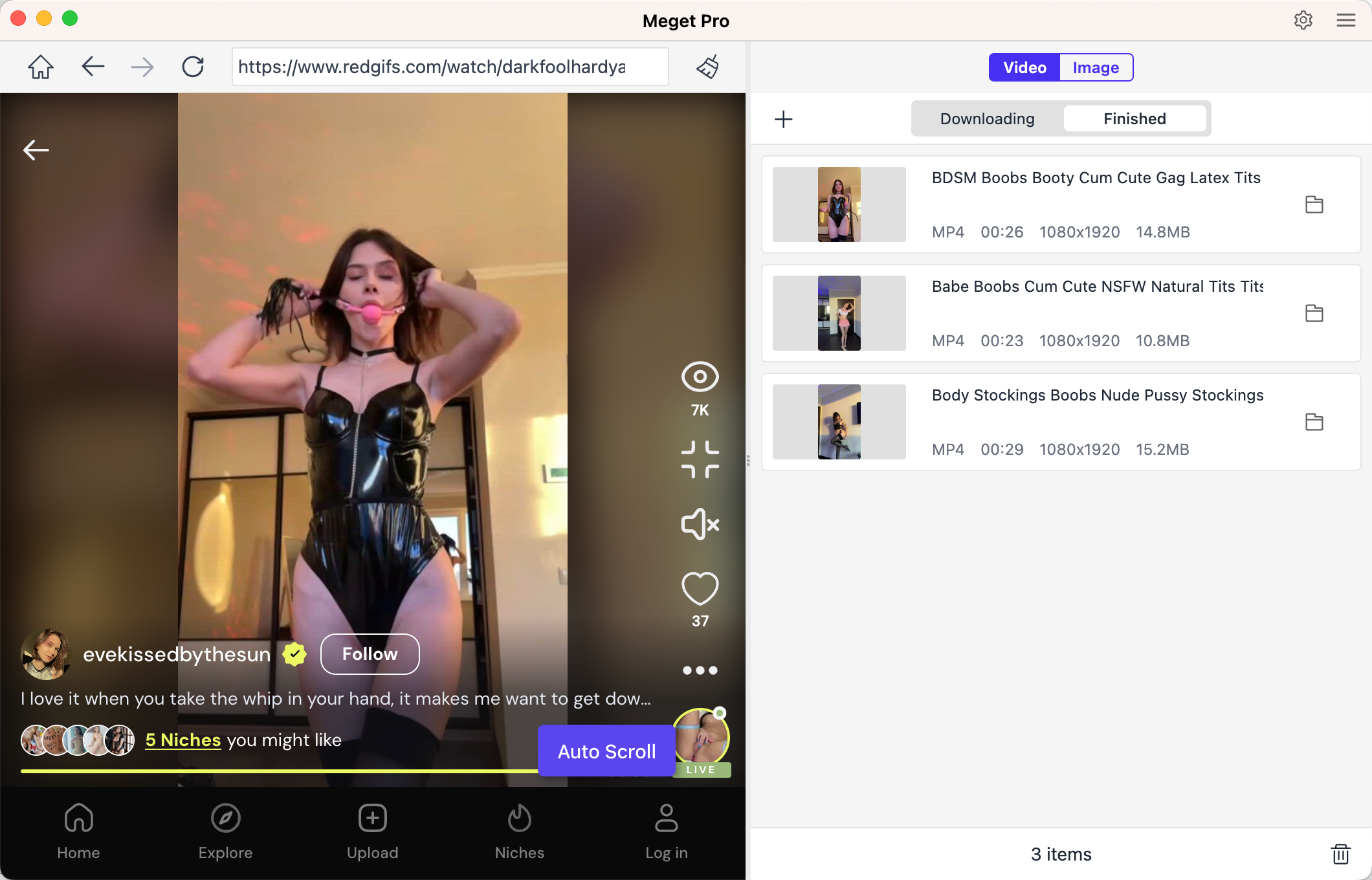
- Acesse a página do RedGifs que contém os vídeos que você deseja baixar, reproduza o vídeo e clique no botão de download para adicioná-lo à lista de downloads do software.
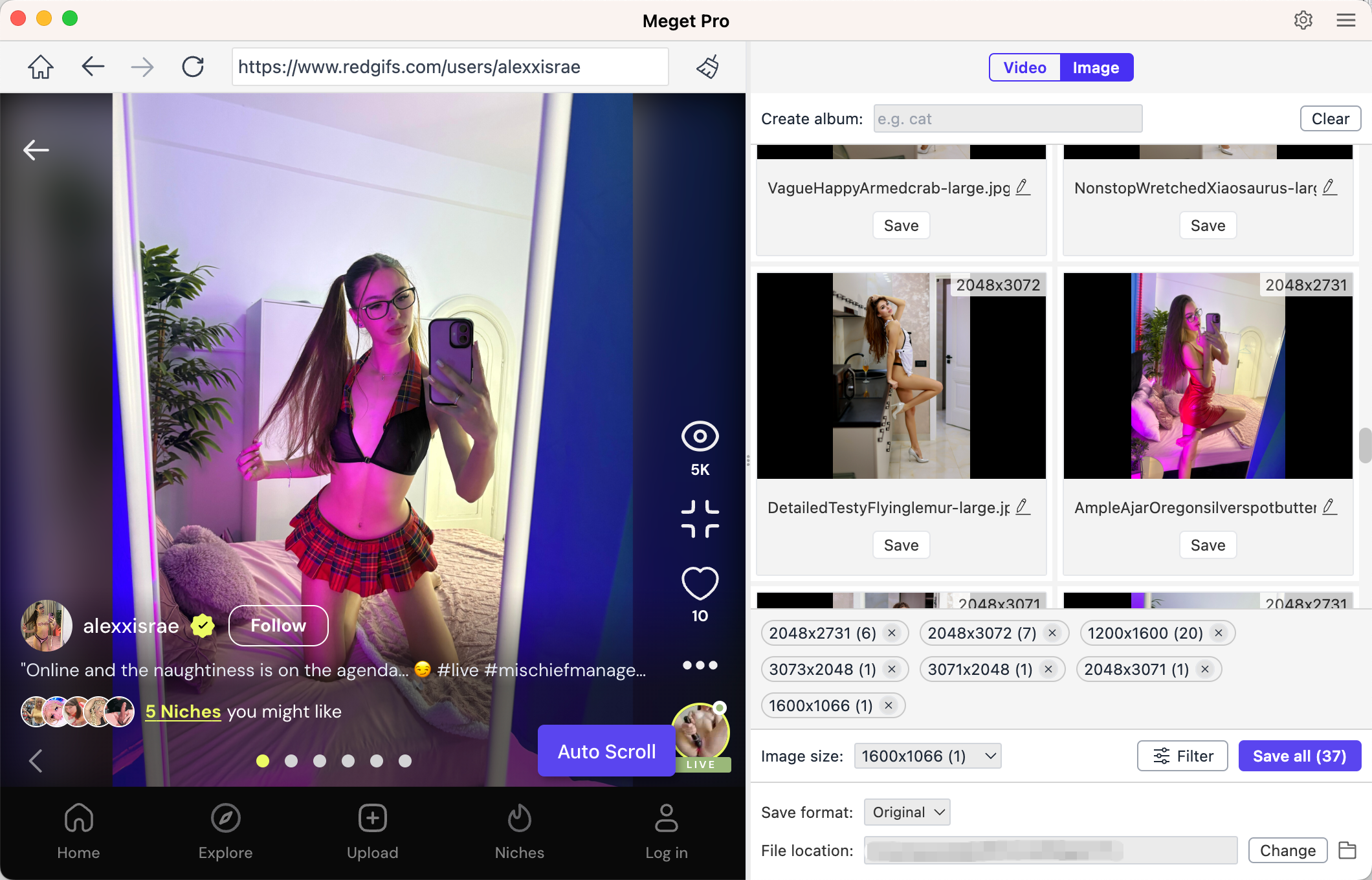
- Para baixar imagens, abra a aba Imagens do perfil do criador e faça com que o Meget Pro faça uma varredura para detectar todas as imagens e GIFs disponíveis. Em seguida, selecione os arquivos desejados e clique em Baixar. Salvar tudo Assim, o Meget Pro salvará todos os arquivos de mídia em pastas organizadas, preservando a resolução original.
4. Conclusão
O erro "Erro ao carregar este GIF" no Redgifs é um problema comum causado por cookies corrompidos, bloqueadores de anúncios, problemas com VPN, GIFs removidos ou interrupções no servidor. A maioria dos problemas pode ser resolvida atualizando a página, limpando os dados do site, desativando extensões conflitantes, trocando de navegador ou ajustando as configurações da VPN.
No entanto, para quem baixa GIFs, imagens ou vídeos com frequência, a solução mais confiável e eficiente é o Meget Pro. Ele suporta downloads em lote e preserva a qualidade, tornando-se a ferramenta ideal para aproveitar o conteúdo do Redgifs sem interrupções.
Quer você esteja tentando solucionar problemas com um único GIF ou criar um arquivo pessoal, Muito profissional Garante uma experiência rápida, sem complicações e sem erros.
- Como baixar filmes grátis do 1movies.bz?
- Como baixar vídeos de cursos de proficiência em inglês?
- Melhores sites de anime para baixar vídeos
- Como baixar vídeos criptografados da Udemy usando o FetchV?
- Como baixar vídeos da Biblioteca de Meta Anúncios?
- Como baixar filmes do BMovies?
- Como baixar do LookMovie?